How DryScout works

From any channel to one structured intake.

A call at night, a form submitted from a phone, a resident at the front desk. Every intake gets the same destination and the same structure.
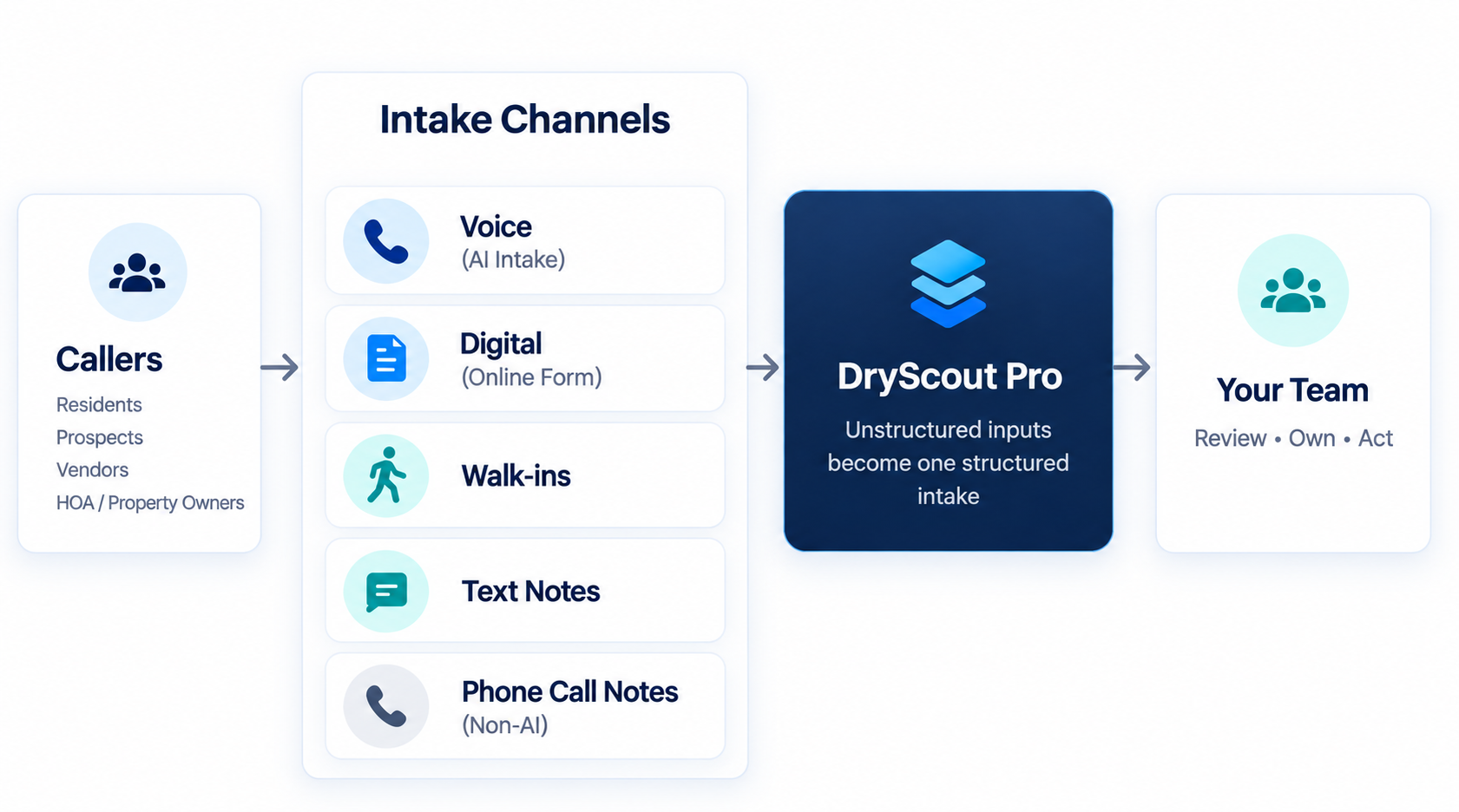
DryScout intake flow: callers (residents, prospects, vendors, HOA / property owners) reach DryScout through Voice, Digital, walk-in, text-note, and non-AI phone-note channels; DryScout Pro turns unstructured inputs into one structured intake for your team to review, own, and act
The workflow

Four steps, every time.

1

Information arrives

A resident calls, a prospect submits the online form, a vendor stops by the office. Any channel, any hour.

VoiceDigitalDesk
2

DryScout structures it

Voice and Digital intake ask the right questions for the situation. Desk Intake gives staff the same fields to fill in.

CallerPropertyReasonUrgency
3

It lands in DryScout Pro

One record with a reference number, the channel it came through, urgency, and for calls, the AI summary and recording.

DSB-00001284EmergencyVoice
4

Your team reviews, owns, acts

Assign an owner. Move the status from New to In Progress to Closed. Every change is logged in the activity history.

Assigned ToIntake Status
What gets captured

The right details, whichever way they arrive.

Not every request needs every field. The intake adapts to why the person reached out.

Caller & Property
Who reached out and where
Caller name and callback phone
Relationship to property
Property address
Unit, when applicable
Best callback time
Reason
Why they reached out
Maintenance or property issue
Leasing inquiry
Owner or HOA request
Vendor or business call
Urgency & Context
What matters right now
What happened or what is needed
When it happened
Whether the issue is still active
Emergency or standard
Affected areas, cause, access notes
Record
What your team receives
Reference number
Channel: Voice, Digital, or Desk
AI summary, transcript, and recording for calls
Assigned owner, status, activity history
After intake

What happens next, and where it happens.

Today, your team works intake inside DryScout Pro. That is where records are reviewed, assigned, and closed, and where the activity history lives.

DryScout does not replace your property-management system. It does not currently sync natively with PMS platforms. What it gives you is a single, structured front door and a clean record to act from.

Authorized roles can export the All Intakes list to CSV, filtered the same way it is filtered on screen.

Inside DryScout Pro your team can:
Search, filter, and sort every intake by date, urgency, channel, status, and location
Assign or reassign an owner; open intakes assigned to an inactive user are flagged for reassignment
Set status: New, In Progress, Closed (reopening requires confirmation)
Review the AI summary, transcript, and recording on voice intakes
See dashboard counts: total intakes, logged intakes, abandoned calls, urgency and outcome mix, volume over time
Export the intake list to CSV (Tenant Admin and Manager roles)
Escalation, on your terms

Your rules. Your vendors. Your control.

When a voice intake needs more than a handoff, DryScout follows the escalation path you define: your preferred vendors, your triggers, your authorization limits, including $0 NTE when approval is required before any work begins. DryScout does not authorize spending and does not choose contractors outside your rules.

FAQ

Common questions.

No. Voice Intake can answer calls the way an answering service would, but that is one channel. DryScout is the intake platform: phone, online, and staff-entered requests all become the same structured record in DryScout Pro, with urgency, an owner, and a status.
Not natively today. DryScout Pro is where intake is reviewed and worked. Authorized roles can export the intake list to CSV. DryScout does not replace your PMS, and we do not claim integrations that are not built.
It replaces several. Calls, online reports, and desk notes that used to sit in voicemail, email, text threads, and notepads land in one list with one format, one owner per record, and a status your team controls.
Voice Intake answers 24/7 and Digital Intake is always available. Urgency and whether an issue is still active are captured at intake, so your team can respond according to its own procedures when it picks the record up.
Sarah, Brian, and Emily are AI intake specialists, not people. They are designed to sound calm and natural and to let callers explain what they need without a rigid phone tree. Calls, transcripts, and recordings are reviewable in DryScout Pro.
Edge cases happen. Every voice intake keeps its transcript and recording alongside the structured fields, so your team can check the source, and the intake experience can be refined as you learn how your callers actually communicate.
Each team member has their own DryScout Pro login. Access is scoped by organization and, where configured, by location, and that scope is enforced at the database layer, not only in the interface. CSV export is limited to authorized roles and to the records that user can already see. We do not currently advertise third-party security certifications.
We configure the intake experience around your operation: caller types, terminology, intake categories, urgency considerations, escalation rules for voice, and how your team reviews intakes in DryScout Pro.
Pricing depends on call volume and deployment requirements. We walk through it during the demo rather than publishing a rate card. Book a demo and we will cover pricing for your setup.

Bring every property request into one place.

Calls, online requests, and staff conversations become one structured intake your team can review, own, and act on.

Book a Demo requests a 30-minute walkthrough with our team. Call to reach Sarah, our AI intake specialist, any time.